During my final lesson observation for my exploration in distributive cognition, I believe it is important to close off with the beginning question; “does technology make us smarter?”
Throughout this exploration I have noticed a reoccurring theme – the use of all technology; meaning manipulative and other helpful tools (not just iPads and computers), when used correctly, has the ability to enhance the learning experience of all students.
In my previous lessons I explored the use of the technology we think of – iPads and SmartBoards. In this post I will be discussing the lesson plan I conducted with all of my students on 3-D shapes, I did not incorporate the use of iPads, computers or the SmartBoard, but I did use helpful tools and manipulatives to facilitate learning.
These manipulatives were real-life 3-D shapes that we can find all around us. I used a gift box (cube), oatmeal container (cylinder), party hat (cone) and a basketball (sphere). Using these examples helped them easily identify the properties of 3 Dimensional shapes (edges, vertices & faces). Without the real examples as manipulatives it would be hard to grasp the understanding of properties.
Once the students grasped the understanding of these properties using these 3-D shapes, they were given pieces of paper with diagrams of the different 3-D shapes that we previously went over. They had to identify where the faces, edges and vertices were without using the manipulatives. This process is also known as translation. “The function of translation refers to the transformation of information from one representational system to another” (Martin, 93). Slowly but surely the children were able to use the knowledge gained from the technology (in this case, the 3 dimensional shape examples) to understand the concepts without using them.
We see this type of learning all the time in classrooms. Students using tools to learn and once they feel comfortable they are able to ween themselves off of this reliance completely. For example “a math teacher may have students learn addition and subtraction with the aid of base ten blocks, which are in most respects isomorphic to the symbol system students will later use” (Martin, 93).
Within all beneficial lesson plans we must also incorporate the function of monitoring as well. “Monitoring refers to the function of assessing the quality of the coordination between systems and providing this information as feedback” (Martin, 94). Or, in other words, all good lesson plans conducted should have some form of assessment to track or “monitor” a students progress. This assessment can be conducted through observation, anecdotal records, running records, checklists, rubrics, the possibilities are truly endless. The common goal is to assess how a child comprehended the subject matter and tweak future instruction to best fit that specific child’s needs. This of course requires differentiation and accommodation based on the individual child. To accurately and efficiently help your students learn you must have a sound monitoring technique to keep track of progress, etc.
In my lesson plan, I conducted observational notes during the whole group portion & a paper/pencil assessment for the individual portion. If this was my own classroom, I would use the information gathered to help each child based on their learning styles and where their comprehension level was at.

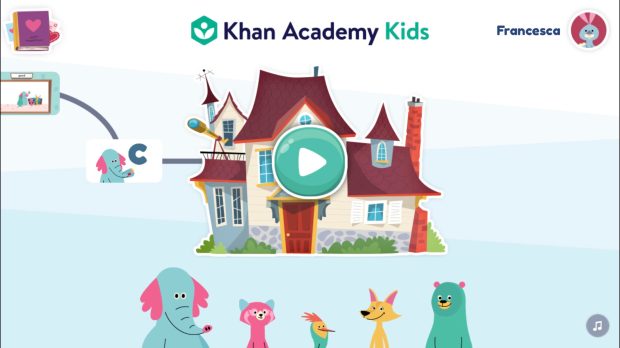 Usually, I would just click the play button on the clubhouse but today I noticed there are sections being added onto the sides. They look like roads leading to the clubhouse and when I click on them they are the important activities I have completed fully. For example, in my last post I talked about working with the letter C, and as we can see there is a section to go back and repeat the lesson. There is also the section above C, which is where we discussed our feelings and sang a feelings song.
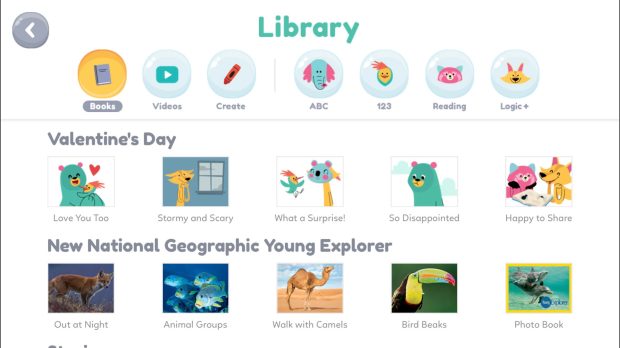 When you click on it, a library of resources pops up. As I mentioned before Khan Academy is completely free and is designed to give education to anyone, anywhere. It is pretty remarkable they worked with businesses like National Geographic to give children access to quality resources such as these.
 Francesca's ED Tech Blog